


HealtheLife
3.41.27K Reviews
App Specs
- Version
- 102.0.31
- Updated On
- License
- Free
- Downloads
- 1,000,000+
- Developer
- Cerner Corporation
- Categories
- Medical
- Platform
- Android, iOS
Screenshots
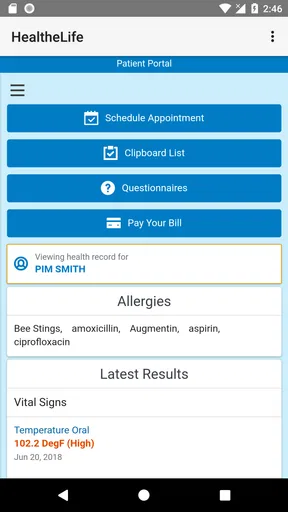
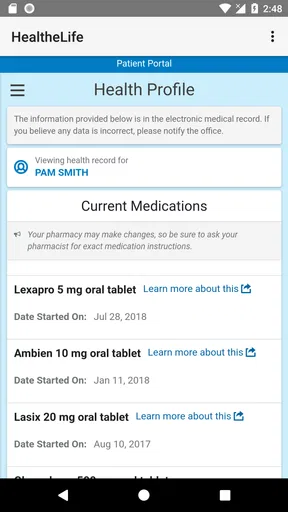
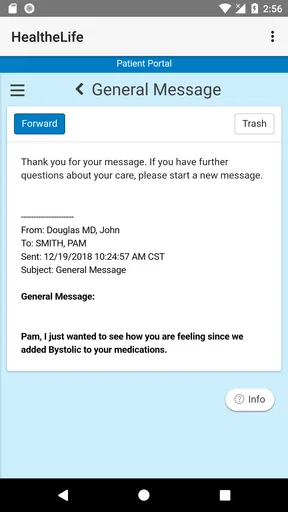
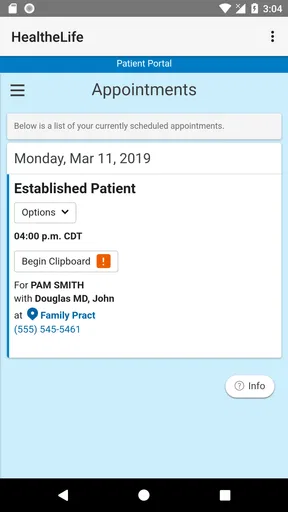

 Analysis by AppCompare
Before installing HealtheLife, it helps to know what kind of tool you’re choosing: it is a medical app from Cerner Corporation, built around managing health information online. I’d think of it as a companion to care you already receive, not a replacement for a clinic, a doctor’s advice, or urgent help. The key question is whether your healthcare provider uses a system that connects with it; that relationship shapes how useful the app can be.
What to expect from a connected health app
Unlike a general wellness tracker, this app is most useful when it can bring together information shared through your healthcare provider. That makes it a different choice from keeping appointment dates in a phone calendar or storing test documents in a folder. Those alternatives can be simpler for one isolated task, but they do not offer the same provider-linked context when records and communication are available through the app.
There is an important trade-off: a medical app can only show information that is available through the connected care setup. I would not assume every clinic, record, or service will appear just because the app is installed. If you mainly want step counting, meal logging, or general fitness coaching, a dedicated wellness app may suit you better. If your priority is staying organized around care, this is the more relevant kind of tool.
Starting with the right expectations
HealtheLife is free, rated for Everyone, and has an average rating of 3.4 from around 2.7 thousand ratings. It has been installed over a million times, so it is used by a broad range of people, though popularity alone does not tell you whether your own provider’s setup will make it a good fit. The app was released on October 26, 2015, and its current version is 102.0.31; it requires Android 9 or later.
I’d approach the first login as a check of access rather than a promise that everything will already be populated. Use the sign-in or enrollment route associated with your healthcare provider, and take care to select the correct organization if you are asked to do so. If you cannot get past account setup, the most useful next step is to check with the provider’s office about access and enrollment, rather than repeatedly creating accounts or guessing at credentials.
A calm first setup
Once you can sign in, I’d start by checking the profile and the information already visible before changing settings or relying on reminders. Confirm that the records and care relationship shown are the ones you expect. This small check matters: a dashboard is only reassuring when you know you are looking at the right account and the right source of care.
Then choose one practical task as your first test. If an upcoming appointment appears, check its date and any available details against what you already know. If you have a medication list, review it for accuracy rather than treating the screen as a substitute for the instructions on the prescription label. This creates a useful habit: use the app to organize and verify information, and contact your care team when something seems wrong or unclear.
Worth Reading Before You Choose

EA SPORTS FC Mobile 26 Is a Bigger Football Game, but It Takes Time

Flipboard Shows What News Apps Must Do Beyond the Feed

Switching to Android Auto Means Rethinking Your Driving Routine

Google Calendar Makes a Crowded Week Easier to Manage

Ludo King Makes the Most of the Minutes Between Plans

Baby Panda World Brings Quick Play to Modern Phones, but Its Game Library Feels Busy
For a first-time user, I would avoid trying to set up every possible health goal at once. Start with the part that solves a real problem for you—such as keeping an appointment in view or finding a record—and learn the layout from there. A smaller first step makes it easier to tell whether the app fits your routine, without turning health management into another complicated project.
The User Experience
First off, let’s talk about the interface. The moment you open the app, you're greeted with a clean, intuitive layout that feels welcoming. Navigating through HealtheLife is a breeze. The developers have clearly put a lot of thought into making sure everything is where you expect it to be. No more endless scrolling or clicking through confusing menus.
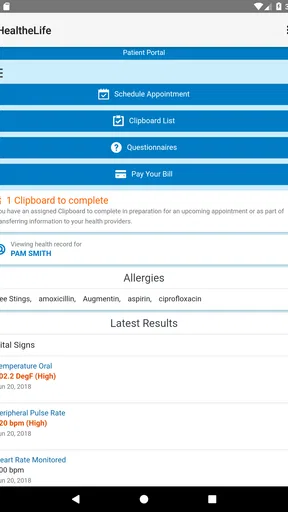
An important feature is the dashboard, which gives you a quick glance at your upcoming appointments, recent lab results, and even your medication list. It’s like having a quick morning briefing every time you log in.
Features That Stand Out
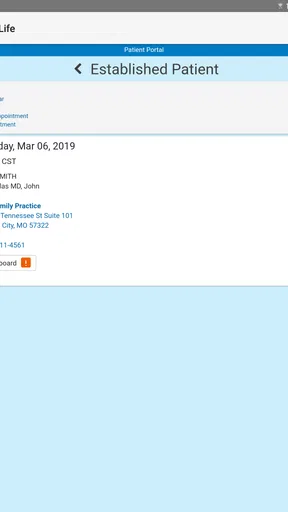
The app is packed with features that cater to a variety of healthcare needs. For instance, you can easily schedule appointments right from your phone. No more waiting on hold with your doctor’s office. Plus, you get reminders for those appointments, which is a lifesaver for the forgetful among us.
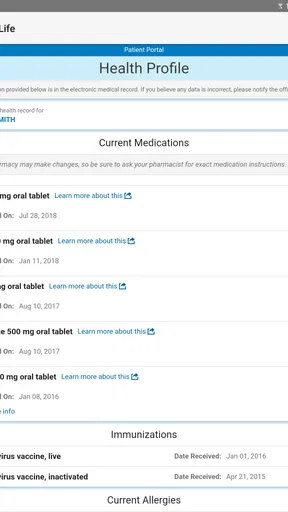
Another gem is the medication management tool. You can not only track what meds you’re on but also set up reminders to take them. It even alerts you when it’s time to get a refill. Talk about peace of mind!
One feature I absolutely love is the ability to access your medical records anytime, anywhere. Whether it’s your latest blood work or your vaccination history, it’s all there at your fingertips. It’s especially handy if you’re seeing multiple specialists and need to keep everyone in the loop.
Turning the dashboard into a useful routine
The most meaningful first success may be modest: checking one appointment before leaving home, or finding a result you need to discuss at a visit. I would use the dashboard as a prompt to prepare, not as a reason to draw medical conclusions on my own. If a result raises a question, write it down and bring it to the clinician who can interpret it alongside your history.
A realistic use case is a person who has a specialist appointment after a busy week. Before heading out, they can check the appointment details, look at any available records, and make a short list of questions. That is more dependable than trying to remember everything in the waiting room. If a family member helps manage care, the patient should still make sure they understand who can access the account and handle sensitive information thoughtfully.
For medication routines, I’d treat reminders as organizational support rather than proof that a dose was taken. A notification can be missed or dismissed, and the app cannot replace careful attention to the prescribed directions. Likewise, refill prompts are useful cues to plan ahead, but I would confirm the next step with the pharmacy or care team when timing, dosage, or availability is uncertain.
Engagement and Connectivity
For those who value connectivity, HealtheLife shines with its ability to sync with your healthcare provider’s system. This means your doctor can update your records in real-time, and you’ll have instant access to those updates. Plus, you can send messages directly to your healthcare team, which is perfect for those quick questions that pop up between visits.
The app also allows you to track your wellness goals. You can log exercise, diet, and other health metrics, making it a holistic tool for managing your overall well-being. It’s like having a health coach in your pocket.
Messages, records, and everyday trade-offs
Messaging is best for non-urgent matters that can wait for a reply. I would use it for a concise question about a routine visit or a clarification that does not need immediate attention, and include enough context for the team to understand what I mean. For severe symptoms or a time-sensitive concern, I would contact the appropriate local medical service instead of relying on an in-app message.
When preparing for care, it can help to open the relevant record before the appointment and note what you want to ask about. That is a practical advantage over scattered screenshots or papers, but it still depends on the information being present and current. If something important is missing, keep your own note or document and ask the provider how it should be added or corrected rather than assuming the app contains a complete medical history.
Compared with a calendar, the app’s potential strength is the connection between scheduling and health information; a calendar remains a useful backup for personal plans or appointments outside the connected system. Compared with a general health tracker, the emphasis here is care coordination rather than simply collecting personal metrics. I would choose based on the job I need done, and avoid expecting one app to replace every health tool.
Privacy and sensible boundaries
Because health details are sensitive, I recommend using a device passcode and being careful about who can see your screen or use your signed-in phone. I would also avoid sharing account credentials casually. These are sensible habits for any medical app, regardless of its security design, and they help protect information in ordinary situations such as lending someone a phone or using it in a public place.
It is equally important to distinguish between access and interpretation. Seeing a test result can help you prepare a question, but the number or label may need clinical context. I would not change medication or treatment based only on something displayed in an app; if it conflicts with instructions from a clinician, ask the care team to clarify.
Security and Privacy
Now, I know what you’re thinking: what about privacy? Rest assured, HealtheLife takes your security seriously. The app uses top-notch encryption to ensure your data stays private and secure. In today’s digital age, that’s not just important—it’s essential.
When another option makes more sense
This is not the right choice for everyone. If your provider does not connect to the service, or you only need a basic reminder for a one-off appointment, a phone calendar may be less effort. If you want broad fitness tracking as your main goal, a wellness-focused app is likely a better match. And if you need urgent medical advice, use a direct clinical or emergency route rather than waiting for a message response.
For someone managing ongoing care, several appointments, or records that are useful to review before visits, the provider connection can make the app worthwhile. The balance is straightforward: it can reduce the effort of finding and organizing information, but it is not a universal portal to every part of a person’s healthcare. I would judge it by whether the care information I actually use is available and easy to find.
Final Thoughts
So, is HealtheLife worth the download? Absolutely. It’s a comprehensive, user-friendly app that makes managing your health straightforward and stress-free. Whether you’re juggling multiple prescriptions, trying to keep track of medical appointments, or just looking to stay on top of your health goals, this app has got you covered.
In a world where healthcare can often feel overwhelming, HealtheLife offers a much-needed breath of fresh air. So go ahead, give it a try and take a step towards more organized, empowered healthcare.
My practical advice is to begin with one useful check after signing in, then return when you have a specific reason—an appointment to prepare for, a record to review, or a non-urgent question to send. That lets you see whether the connection fits your real routine rather than judging it by a long feature list. If access works and the information helps you feel more prepared for care, it can earn a place among your everyday tools; if not, a simpler alternative may be all you need.
Pros
- User-friendly interface for easy navigation.
- Seamless integration with health records.
- Real-time updates on medical appointments.
- Secure access with robust privacy features.
- Customizable notifications for medication.
Cons
- Limited offline functionality available.
- Some features require premium access.
- Occasional syncing issues reported.
- Interface may be overwhelming for new users.
- Customer support response can be slow.
FAQs for HealtheLife
What is HealtheLife and how can it benefit me?
HealtheLife is a comprehensive health management app designed to connect you with your healthcare provider and give you access to your medical records. It benefits users by allowing them to schedule appointments, view test results, and communicate with their healthcare team, all in one convenient location.
Is my personal health information safe with HealtheLife?
Yes, HealtheLife prioritizes user privacy and employs robust security measures to protect personal health information. The app uses encryption and secure user authentication to ensure that your data is accessible only to you and authorized healthcare providers.
Can I schedule appointments through HealtheLife?
Absolutely. HealtheLife allows you to manage your healthcare appointments at your convenience. You can view available slots, schedule, reschedule, or cancel appointments directly through the app, making the process efficient and hassle-free.
Does HealtheLife work with all healthcare providers?
HealtheLife is compatible with healthcare providers that have integrated their systems with the app. It’s essential to check with your provider to see if they support HealtheLife, as this will determine the app's functionality and the features available to you.
How do I set up and use HealtheLife for the first time?
Setting up HealtheLife is straightforward. After downloading the app, create an account using your email and verify your identity. Once logged in, you can link your healthcare provider by entering the unique code provided by them, enabling you to access all available features.


